Teams standardized on Figma still struggle when design partners deliver files that require cleanup before engineers can use them. Loose layer hierarchies, disconnected components, missing Auto Layout, inconsistent naming, and absent Dev Mode annotations turn handoff into translation work. Variables go unused where they should power theming. Prototypes break the moment content changes. The tool is capable, but the output depends entirely on how well it is applied. When Figma is used as intended, design moves faster, developers build with fewer questions, stakeholders review in real time, and the design system becomes a living asset rather than a static archive that drifts away from production week after week.
UX Stalwarts offers Figma design services engineered for how modern product teams actually work. The scope spans Figma website design, Figma mobile app design, Figma dashboard design, and Figma product design services with every file built on clean Auto Layout foundations, Variable-driven tokens, properly structured Components with variants, and Dev Mode annotations ready for engineering consumption. Figma prototype design includes interactive flows that simulate real product behavior before development begins. Figma UX design services cover research, information architecture, and flow mapping inside FigJam. Figma UI design services produce pixel-accurate screens governed by shared libraries. The result is a single source of truth your whole organization can trust.
With eighteen years of design delivery across more than a thousand engagements, the expertise behind every Figma engagement includes mastery of Variables, Components, Auto Layout, Dev Mode, Code Connect, FigJam, Figma Sites, Figma Slides, and the recently released Figma MCP server that brings design context directly into AI coding workflows. Where most vendors treat Figma as a tool label on a generic service page, this practice treats it as a strategic platform whose features, when applied deliberately, compress timelines, reduce handoff friction, and raise the ceiling on what product teams can actually ship from a design file.

Every Figma file follows a documented structure with consistent page naming, frame conventions, and layer hierarchies your team can navigate without a guided tour. Cover pages explain file purpose. Sections separate work-in-progress from production. Naming standards match the code conventions your engineers already use for faster translation.

Color, spacing, typography, and radius tokens are built as Variables with mode support for themes, brand variations, and density options. Variables map cleanly to code token formats through established export paths. Your dark mode, multi-brand architecture, and accessibility toggles become configuration rather than duplication.

Component libraries are built with full variant coverage including hover, focus, active, disabled, and error states from the start. Component properties replace variant explosion with clean boolean toggles and text overrides. Slot-based composition allows content flexibility without breaking the component structure, reducing detach-and-edit shortcuts.

Every deliverable frame is marked Ready for Dev with annotations for spacing rationale, interaction behavior, and responsive logic. Code Connect links Figma components to your actual production code where the infrastructure supports it. Engineers see real component imports instead of generic auto-generated CSS snippets.

Stakeholders, engineers, QA, and content teams join files directly for comments, annotations, and live reviews rather than receiving static exports. FigJam sessions capture flow discussions alongside the design. Multiplayer editing lets multiple designers work in the same file without version conflicts or merge headaches during sprint cycles.

Files are structured so the Figma MCP server and AI coding assistants can read them accurately. Auto Layout values, Variable references, and component properties translate into production-ready code rather than pixel-guessed approximations. This forward compatibility protects your investment as AI-assisted development adoption accelerates.

When Figma is applied with discipline, sprint velocity measurably improves. Engineers ask fewer clarification questions because Dev Mode specifications answer them in advance. Designers reuse components instead of recreating them, compressing production time across new features. Stakeholders approve work faster because prototypes communicate intent more clearly than static mockups. Design system updates propagate instantly through published libraries rather than requiring file-by-file edits. The affordable Figma design services behind each engagement combine tool expertise with product strategy to deliver outcomes that static tools and generic agencies cannot match across the realities of modern product development.
Work with a Figma design agency that ships clean.
This Figma-native methodology ensures every project leverages the platform's collaborative and technical capabilities from initial scoping through developer handoff.

We define the project scope, invite stakeholders, and configure the Figma team workspace with appropriate permissions, library access, and file organization. Existing brand assets, tokens, and libraries are audited and imported. This phase produces the file skeleton your team will navigate across the engagement.

User research synthesis, information architecture mapping, user flows, and journey diagrams are built in FigJam alongside the design file. Stakeholders contribute to whiteboards in real time. The research artifacts remain linked to the design file, keeping strategic rationale one click away from every screen decision.

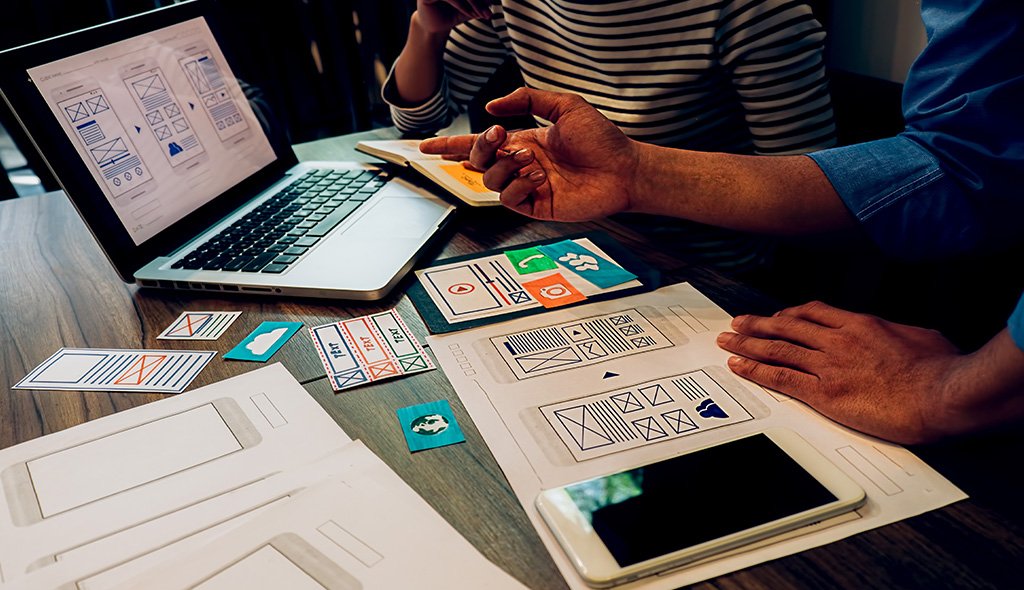
Low-fidelity wireframes are produced with Auto Layout from the start so they scale into high-fidelity without rework. Component inventory is planned against the wireframes to identify reusable patterns. Variable structure is drafted for color, typography, and spacing tokens that will govern the high-fidelity phase.

Pixel-accurate screens are produced using the planned component library and token structure. Variables drive all color, spacing, typography, and radius decisions. Mode support is configured for light and dark themes where relevant. Accessibility contrast is validated during design rather than audited afterward as a compliance step.

Interactive prototypes are built using Figma’s native prototyping features, including conditional logic, Variables-driven state, and overlay flows. Prototypes are tested with stakeholders and users before engineering begins. Feedback captured through comments flows directly into design revisions without external tools or exported screenshots cluttering the review.

Frames are marked Ready for Dev with annotations, interaction notes, and responsive guidance. Code Connect links production components where the engineering stack supports it. A walkthrough session orients the development team to the file structure, Variable architecture, and where to find answers without pinging designers.
Across more than 1,000 engagements, explore how Figma-native workflows have accelerated delivery for startups and enterprise product teams.
The Figma file structure and component needs of a financial dashboard differ substantially from a consumer mobile app or a multi-tenant SaaS platform. Each engagement begins with the specific product architecture, engineering stack, and team workflow of your organization. From startups shipping their first MVP to enterprises consolidating scattered design files across business units, the approach adapts to match product complexity and team scale.
Cross-sector experience spanning financial services, healthcare, education, retail, logistics, SaaS platforms, and government digital services informs every Figma decision. When a healthcare platform requires HIPAA-compliant UI components with clinical credibility, or when a fintech product needs a dashboard design system that supports multiple currencies and locales, that product context shapes Variable structure, component modeling, and handoff specifications throughout the engagement from scoping to final delivery.

When organizations evaluate a professional Figma website design company, they need more than confirmation that designers can use the tool. They need a partner who understands how Figma features combine to produce files that survive engineering handoff, scale with product growth, and stay useful as design system requirements evolve over time.
Tool Mastery Meets Product Thinking: Deep Figma expertise sits alongside research, strategy, and interaction design capability so the file serves the product, not the platform.
Engineering-Friendly Output by Default: Files are built to be read by developers, AI coding assistants, and future team members without explanation required.
Future-Ready Figma Ecosystem Use: Variables, Dev Mode, Code Connect, MCP server, FigJam, and Figma Make are applied where each delivers measurable advantage.
Each engagement leverages the full Figma platform beyond the core design tool. Ecosystem adoption ensures every capability serves a defined purpose within the overall delivery.








UX Stalwarts transformed CloudCorp’s chaotic Sketch environment into organized Figma excellence. Reducing design debt 89 percent and achieving 94 percent component consistency eliminated years of fragmentation. Onboarding accelerating from 3-4 weeks to 4-5 days and design velocity increasing 67 percent proved Figma migration as productivity multiplier. This was transformational for our scaling.
UX Stalwarts unlocked Figma prototyping mastery transforming our user research capability. Costs dropping 78 percent from $15,000 to $3,300 per project eliminated development bottlenecks completely. Iteration speed increasing 12x and testing rounds growing from 1-2 to 4-6 enabled evidence-based design. Margins improving from 40 to 68 percent proved prototyping efficiency drives profitability.
UX Stalwarts prevented the Figma chaos we feared during 4x scaling. Growing from 3 to 12 designers while maintaining 96 percent component consistency seemed impossible until proper architecture was established. Product velocity increasing 320 percent and new designers productive in 5 days proved foundation enabled scaling. This was exactly the expert guidance we needed.
Clear answers for teams evaluating a Figma-based design partnership now.
Figma design services use Figma as the central platform to deliver the full range of product and website design work. Typical scope includes Figma website design, Figma mobile app design, Figma UI/UX design, Figma dashboard design, component library development, Variable token architecture, interactive prototyping, and Dev Mode-optimized developer handoff. A comprehensive engagement also covers research artifacts in FigJam, design system migration from other tools where needed, and governance setup for file structure, component publishing, and library maintenance. The defining characteristic is that every deliverable lives natively in Figma rather than being produced elsewhere and imported, enabling real-time collaboration across design, engineering, and stakeholder teams. Many Figma design services firms bundle these capabilities as integrated Figma design solutions, while a dedicated Figma UI/UX design agency adds research depth on top.
Costs vary based on project scope, screen count, and platform complexity. A focused Figma web design services engagement for a marketing website with 15 to 25 screens typically ranges from $8,000 to $25,000. Figma app design services for a mobile MVP with 30 to 50 screens usually range from $15,000 to $40,000. Complex platforms requiring dashboards, design systems, and Variable architectures range from $30,000 to $100,000. Affordable Figma design services are available for startups through focused scope and streamlined component libraries. Enterprise engagements involving multi-brand workspaces, design system migration, and Code Connect setup typically range from $60,000 to $250,000. A scope assessment based on your specific requirements produces the most accurate estimate. The best Figma design companies and best figma design agencies publish indicative ranges so buyers can plan, and a professional Figma website design company often itemizes Figma website design services separately from Figma dashboard design services.
Figma runs in the browser and supports real-time multiplayer collaboration, while Sketch is a macOS desktop application with file-based sharing and Adobe XD is transitioning out of active development. Figma includes Variables, Dev Mode, Code Connect, and a growing AI-integrated ecosystem through the MCP server that tools like Sketch do not match. For teams on mixed operating systems, remote collaboration, or design-to-code workflows, Figma typically delivers faster handoff and fewer tool conflicts. Sketch remains strong for designers who prefer a macOS-native experience, but the industry center of gravity has shifted decisively toward Figma for product and web design over the past five years. Teams evaluating Figma design consulting services typically compare workflow fit before tool preferences.
Partially, and the quality depends on how the Figma file is built. Dev Mode generates code snippets for CSS, iOS, Android, and other frameworks, but these are generic unless Code Connect is configured to link Figma components to your production code. The Figma MCP server lets AI coding assistants read the underlying structure of your design including Auto Layout, Variables, and component properties, producing more accurate code than screenshot-based AI tools. Files built with clean Auto Layout, well-scoped Variables, and properly structured Components translate into code far more reliably than files that rely on fixed positioning and detached instances. Structure determines conversion quality. A Figma mobile app design company will usually pre-configure Code Connect for the relevant native frameworks.
Figma Dev Mode is a dedicated workspace within Figma designed for engineers inspecting designs for implementation. It shows component metadata, Variable references, spacing specifications, responsive behavior, annotations, and generated code snippets in the language of your choice. Frames can be marked Ready for Dev so engineers immediately know what is stable versus in-progress. Code Connect optionally links Figma components to actual production code imports, so developers see real component names instead of generic CSS. When used correctly, Dev Mode eliminates most clarification questions and reduces the time between design approval and production shipping by a significant margin on each sprint. This is one reason Figma UI design services and Figma UX design services are increasingly bundled rather than separated.
Figma Variables are tokenized values for colors, numbers, strings, and booleans that can be referenced throughout your design file instead of being hardcoded into individual styles. They support multiple modes, which enables light and dark themes, multi-brand variations, and density options to live within a single component rather than requiring duplicated variants. Variables map cleanly to code token formats like those defined by the W3C Design Tokens Community Group, supporting export into CSS custom properties, iOS assets, and Android resources. Teams building serious design systems now treat Variables as foundational rather than optional. Our design system creation services detail how Variables integrate into broader system governance. Figma product design services for complex applications rely on this token foundation.
Yes. Migration typically begins with an audit of the existing file structure, component library, and styles. Automated import tools handle a significant portion of the visual assets, but human judgment is required to restructure components with Auto Layout, convert static styles into Variables, and map file organization to current team workflow expectations. Migration is also an opportunity to address accumulated design debt rather than simply transplanting legacy structures. A typical Sketch to Figma migration takes four to ten weeks depending on library complexity and screen volume. The output is a cleaner system that performs better in Figma than a direct one-to-one conversion would provide. Some figma website designs firms underestimate this rework and ship migrations that simply mirror legacy structure.
Figma prototype design produces interactive, clickable flows that simulate actual product behavior including navigation, state changes, overlays, conditional logic driven by Variables, and scroll interactions. Static mockups show screens but require viewers to imagine the connections between them. Prototypes validate user flows, interaction patterns, and product logic before engineering investment begins, which reduces costly rework. They also communicate intent to stakeholders more effectively than static images, shortening approval cycles. For teams running usability tests or validating product decisions before development, our prototyping services cover the strategic use of interactive prototypes across product discovery and validation. A Figma prototype design agency will configure Variables-driven state from the outset rather than retrofitting it after design approval.
Yes. Figma website redesign services typically begin with a UX audit of the existing site, heatmap and analytics review where available, and a competitive analysis of industry peers. The redesign then proceeds through the same six-phase process used for new builds, with additional attention to content migration planning, URL structure preservation, and parallel-run testing against the existing site. Working in Figma for website redesigns allows stakeholders to review and comment on proposed layouts in real time rather than waiting for static PDF presentations. Once approved, Dev Mode ensures the front-end team can implement the new design without translation loss or pixel-level debates. Mature Figma website design services and Figma design solutions both treat redesigns as audits first, not visual refreshes.
AI-assisted design inside Figma leverages features like Figma Make (prompt-to-prototype), the Figma MCP server that lets AI coding assistants read your design structure, and AI plugins for image generation, content population, and component state creation. Used thoughtfully, these capabilities compress early exploration time and accelerate handoff quality. Used carelessly, they produce generic output that does not serve your product. The workflow here applies AI where it genuinely accelerates outcomes, such as first-draft content population, accessibility checks, and design-to-code translation, while keeping strategic design decisions with experienced designers who understand the product context and business objectives. A modern Figma UI/UX design agency now treats the MCP server as standard tooling rather than experimental.
Timelines depend on scope and approval cycles. A focused marketing website with 15 to 20 screens typically takes four to eight weeks in Figma from kickoff to Dev Mode handoff. A mobile MVP with 30 to 40 screens usually takes eight to twelve weeks. A comprehensive SaaS platform with dashboards, design system, and multiple user roles ranges from twelve to twenty weeks. Projects with established brand guidelines, clear stakeholder decision-making, and validated product direction move faster. Engagements involving research phases, multiple design iterations, or parallel design system development naturally take longer but produce more defensible output and stronger adoption after launch. Timelines from the best figma design agencies and best Figma design companies typically cluster within these ranges for comparable scope, and Figma app design services from a Figma mobile app design company usually run on the longer end.
File organization follows a documented structure: a cover page explains the file purpose, contact points, and status conventions; a resources page holds reference materials; sections separate research, wireframes, high-fidelity designs, prototypes, and component libraries; pages are named consistently with emoji prefixes that indicate status at a glance. Component libraries are published from dedicated files rather than living inside product files. Variables are organized into collections by purpose: primitive, semantic, component. Naming conventions match the code conventions your engineers use. This structure means new team members can navigate the file on day one without a designer walking them through every screen. Figma design services firms with mature delivery treat file organization as a first-class deliverable, and a Figma prototype design agency applies the same discipline to prototype files.
Yes. Engagements are structured to work within your existing Figma team or organization account with appropriate Editor or Viewer seat assignments. File access, library permissions, and branch workflows respect your governance policies. For enterprises requiring additional security, NDA and confidentiality terms are signed before access is granted, and work can be confined to dedicated projects within your workspace. This approach ensures design files never leave your controlled environment, library publishing happens within your established approval flows, and knowledge remains in your system after the engagement concludes without requiring export or file handover. Figma design consulting services delivered inside your workspace also reduce onboarding time for future internal designers.
Final deliverables include the structured Figma design file with all screens, a documented component library (often as a separate file for independent versioning), Variable collections configured with mode support, an interactive prototype of the approved flows, Dev Mode-ready frames with annotations, exported brand assets in required formats, and documentation covering file organization, component usage, and handoff conventions. For larger engagements, a handover session orients the in-house design and engineering teams to the file structure so ownership transfers cleanly. For teams needing more polished final screen outputs for marketing or stakeholder use, our mockup design services complement Figma engagements with dedicated high-fidelity production work. These outputs reflect what figma website designs firms and a professional Figma website design company should deliver as standard, alongside Figma dashboard design services artifacts when dashboards are in scope, and Figma web design services patterns for the broader site.
Starting begins with a conversation covering your product goals, target platforms, team workflow, existing design assets, timeline, and budget range. Helpful materials to share include your current Figma workspace access if available, brand guidelines, product documentation, competitor references, and any prior design work. From there, a scope proposal outlines the recommended engagement phases, deliverables, timeline, team structure, and investment. For organizations evaluating the broader value of strategic design investment before committing, our insights on quantifying design ROI provide a framework for connecting Figma design investments to measurable business outcomes across product and marketing.

C – 81C, Sector – 8, Noida 201301, India


1025 Beamon Drive, Franklin 37064 Tennessee, USA
Sveavagen 34 111 34 Stockholm, Sweden
A-10, Sahastradhara Rd, Doon IT Park, Dehradun, Uttarakhand

© 2026 UX STALWARTS. All rights reserved.