
You’ve created a brilliant SaaS product. Users love it during demos. They rave about the features. Then they strike up to your pricing page, and they disappear. The excited prospect that was ready to sign up thirty seconds ago is now gone.
What happened between “this is amazing” and Radio Silence? Your pricing page demanded too much work from their brain. Four tiers with nineteen features each. Confusing designations such as “Professional Plus” vs. “Premium Pro.” Toggle between monthly and annual. Add-ons. Asterisks leading to fine print. Comparison tables that need spreadsheet analysis.
Their working memory was swamped by the load. Decision paralysis set in. They thought. “I’ll come back to this later” and they never did. You lost a customer, not because your product doesn’t work, but because your pricing page required a greater cognitive investment than they were prepared to make.
Your pricing page isn’t a menu – it’s a negotiation between what users want to pay, and what your product is worth. Everything you do on the page, from the way you stack tiers to the colours you use for buttons play into psychological triggers that determine whether or not browsers will turn into buyers.
Here’s the reality: Pricing page redesigns that use psychology-backed strategies increase trial signups by 35-50%, improve plan selection clarity by 40% and reduce pricing-related support questions by 60%. Yet most SaaS companies view pricing pages as afterthoughts, throwing together lists of features without a clue as to what’s going on in the minds of people considering options.
Users coming to your pricing page have three questions at the same time: Can I afford this? Will this solve my problem? Which option fits my needs? Your page design makes the difference between them being able to answer with confidence or abandon with confusion.
When used to compare plans, users don’t analyse rationally like spreadsheets. They use mental shortcuts that seem logical to them, but are emotional triggers.
Anchoring establishes the point of reference. The first price shown to the user becomes the anchor against which everything else is compared. That’s why many SaaS companies list their premium tier first or left-most-welcome to the rest of the list comes, making other options reasonable by comparison.
When you see a $999/month enterprise plan, all of a sudden, $49/month for the middle tier is a bargain. Your brain is anchored at $999, so $49 is small. Without such an anchor, $49 could have seemed expensive.
The decoy effect encourages the user to the plan you want them on. You don’t really want your users to be choosing three tiers equally. In this case, you want to choose the middle option where margins are highest.
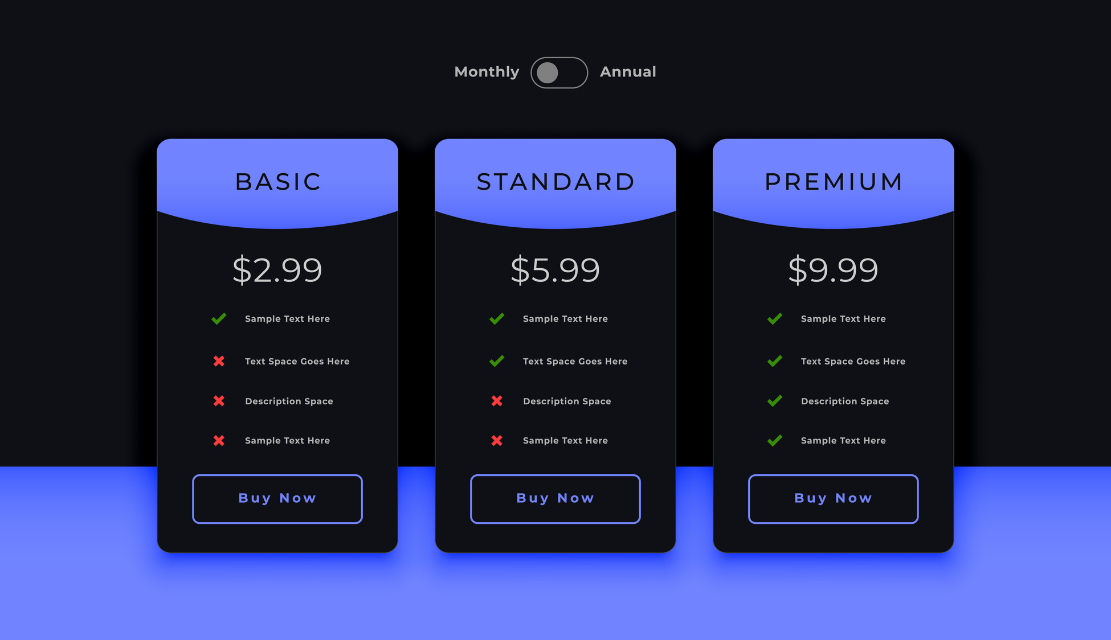
So you engineer a decoy. Make the basic plan too limited to be useful. Price the premium plan high enough so that it seems excessive for most of the users. Suddenly, the middle one seems just right – not too bare, not too expensive. Users “choose” it, feeling smart about finding the balanced option that you designed them to select.
Loss Aversion is a Harsher Strike than Potential Gains. Users are afraid of losing something more than they want to gain it. That’s why “14-day free trial” converts better than “try before you buy.” The trial provides them with the product. Not upgrading means losing on what they already have.
This is also the reason why annual billing discounts work. “Save $240/year” works better than “Get 20% off” because users imagine the money they’ll lose by opting for monthly billing. The feared loss is a greater motivator than abstract percentage gain.
Users don’t read pricing pages; they scan them, following visual cues that attract attention to particular elements. Smart UX designers exploit this scanning behaviour to steer users towards conversion.
Size and positioning are hugely important. The plan you want the users to pick should be physically larger, in the centre, or a little bit higher than the others. This subtle visual prominence says without explicitly saying, “this is the right choice.”
Zoom does this brilliantly. Their “Pro” plan literally pops out from the page, being taller than other options nearby. Your eye goes there first. It seems important, popular, and recommended. You’re already leaning in your mind toward it before comparing features.
Colour psychology has an impact on perception. Bright colours are for attracting attention. But the wrong colour can cause the wrong emotion. Green implies savings or success. Blue builds trust. Orange creates urgency. Red is a warning colour or danger.
Your call-to-action buttons require colours that stand out from the other elements and have a similar emotional tone to the one you are seeking. “Start Free Trial” in confident blue also works differently from urgent orange, even with the same copy.
Contrast results in less cognitive load. When they are required to work to find differences between plans, users get frustrated. Make differences obvious through visual design. Use icons, checkmarks vs. dashes, and make a visual separation between tiers.
Research shows that 86% of B2B buyers claim that transparent pricing plays a role in their purchase decisions. Hiding prices behind “Contact Sales” causes friction that kills conversions for products less than $5000 annual cost.
But transparency is not sufficient. Social proof is the validation that users need.
Highlighting your plan of recommendation creates the bandwagon effect. Most Popular indicates that others selected this option. Users assume those people knew something, and so this must be right.
Customer logos and testimonials create trust by using borrowed credibility. If recognisable brands trust your product, there is a feeling of safety among prospects. But match testimonials to pricing tier – display small business testimonials for affordable pricing tiers and enterprise logos for premium pricing.
Usage statistics make use of consensus bias. Joining 10,000+ companies implies popular approval. Humans understand popularity as evidence of quality.
Every form field, every click, every time you get confused – you’re losing potential customers.
Simplify the path. Three tiers presented better than six. Clear tier names (“Starter,” “Professional,” “Enterprise”) are better than creative names. Obvious feature differences are better than long comparison tables.
Remove uncertainty. Preempt answers to questions that users have not even asked. “What happens after my trial?” “Can I change plans?” Mandatory form fields were removed by Intercom, and they saw 32% increased conversion rates without compromising lead quality.
Make the process of upgrading seem reversible. “Cancel anytime” lowers the perceived risk. This “downgrade available” makes premium plans not so scary. “No credit card required” eliminates barriers to payment. Users commit more easily when they perceive that they can back out.
More than 30% of B2B research occurs on mobile. Mobile screens aren’t able to display three plans side-by-side in a good way. Users must scroll to compare.
On the mobile, however, simplicity is critical. Fewer features listed. Larger buttons. Clearer distinctions. Test your pricing page on real phones – the experience is completely different from resized desktop browsers.
Your assumptions about what users want are most likely wrong. A/B test different elements in a systematic manner. Try different plan names. Test between monthly and annual as default. Experiment with emphasizing tiers.
Companies that test pricing pages on a regular basis average 14% higher conversion rates. Small changes do produce big revenue gains. Test one variable at a time with enough traffic and then declare winners.
SaaS pricing page UX is applied psychology to determine whether prospects become customers.
Every element is involved in cognitive biases that influence decisions. Anchoring renders options reasonable or expensive. Decoys steer people towards choices that are preferred. Loss aversion is a motivator for commitment. Social proof is used to validate decisions.
Visual hierarchy is a direction of attention. Simplified comparison makes the cognitive load smaller. Transparency builds trust. Mobile optimization is capturing diverse traffic.
Users use mental shortcuts based on the way you present information. Understanding those shortcuts enables you to design pages that work with human psychology.
Your brilliant product deserves a pricing page as well as your solution delivers. Stop making pricing pages the necessary evil. Start engineering them as strategic tools based on sound psychological principles that have been proven.
Ready to turn your SaaS pricing page into a conversion powerhouse?
Our UX design experts are masters of psychology-based pricing experiences that transform browsers into buyers. Let’s Try to Optimize your Pricing Page for Maximum Conversions
Three to four tiers are ideal for most SaaS products. Fewer than three, and you limit flexibility and leave money on the table from users who will pay more. More than 4 and we get decision paralysis where users will get overwhelmed comparing too many options. The sweet spot is three core tiers (Basic, Professional, Enterprise) with an optional fourth tier for either entry-level or high-touch enterprise customers. This structure includes choice without overwhelming users, and is consistent with how most people instinctively categorise their needs: “I want cheap,” “I want balanced,” or “I want everything.”
Default on monthly pricing for transparency, but make annual savings very visible. Most users think in terms of months when it comes to budgeting, so monthly pricing would be more understandable. However, prominently show annual savings (like “Save $240/year”) to induce longer commitments via loss aversion psychology. Use a toggle with a default setting of monthly, but allows you to switch to annual with a single click. The key is allowing users to choose by making annual seem like the smarter choice through obvious savings communication.
Price hiding leads to friction and mistrust. For products that are under a $5000 annual cost, requiring a sales contact to reveal pricing can cause a decrease in conversions of up to 80%. Users prefer to self-qualify and make sound decisions without being pressured by sales representatives. When they can’t see prices, they assume that the product is too expensive or the company is not confident in its value. Transparent pricing: Respecting the time and intelligence of the users. Reserve “Contact Sales” only for really custom enterprise solutions where pricing really does vary based on complex requirements.
Use hard evidence such as “Most Popular” or “Best Value” based on real data. Visual prominence by size, position or slight elevation works without deceit. The idea is getting users to the option that truly serves most of the customers the best, which should be your preferred plan anyway, because it is a balance of value and profitability. Manipulation would be falsely presenting something as “most popular” when it is not, or concealing limitations to trick or trick users into making the wrong choice. Ethical persuasion helps users to make good decisions faster.
Track conversion rate from pricing page visit to trial signup or purchase. This one single metric captures whether your page is successful in moving your interested prospects to action. Secondary metrics are important (time on page, plan distribution, exit rate), but pricing on page conversion rate is a direct measure of success. Benchmark yourself against industry standards (typically 2-8% for SaaS) and test improvements. Also, keep track of which plan your users are using to make sure that your tiering strategy does not match what your customers actually need, and you’re not just forcing everyone to the cheapest option.

C – 81C, Sector – 8, Noida 201301, India


1025 Beamon Drive, Franklin 37064 Tennessee, USA
Sveavagen 34 111 34 Stockholm, Sweden
A-10, Sahastradhara Rd, Doon IT Park, Dehradun, Uttarakhand

© 2026 UX STALWARTS. All rights reserved.

