A poorly designed chatbot interface costs more than the project that created it When users can’t find the input field, when they misinterpret the bot’s response as a human agent’s response, when users hit a dead end error message with no clear path forward, or when users just give up due to the visual design causing friction between the bot and the user before the conversation starts, these losses are absorbed by the business through the increased support volume, decreased self-service rates, and measurable drops in customer satisfaction scores. Chatbot interface design is where most of that failure comes from, and the layer that most organisations devote the least time and resource to compared to the conversational AI powering it.
Our practice covers the full visual and interaction spectrum of chatbot UX design, from the placement of widgets and opening screen that determine whether users will engage at all, through the layout of messages, quick-reply button design, input field behaviour, typing indicator, and avatar treatment that control readability and pacing, to the fall back states, error messages, and human handoff pathways that control whether the experience will end in recovery or abandonment. Every component is designed with the same discipline used for any enterprise product interface, because the conversation window is a product interface and it deserves to be treated as one.
UX Stalwarts brings cross-industry delivery experience in AI interface design for chatbot products implemented in cross-industry enterprise customer service, fintech self-service, healthcare triage, hr automation, and b2b saas onboarding use cases. Our team knows that the specific visual and interaction requirements of a conversational interface are fundamentally different from those of a dashboard or a form, and we design accordingly, with every design decision traceable to a measurable user or business outcome rather than an aesthetic preference.

The visual layer of a chatbot is not decoration that is applied after finalising the conversation flow. Our approach to UI design for chatbot products starts with interface architecture, defining how information, options, inputs, and system states are organised and prioritised before the design of a single visual component or selection of colour scheme.

The quality of a chatbot interface is best reflected in the failure points. We scope, design, and validate fallback messages, confusion state prompts, and dead-end recovery pathways as primary deliverables – not afterthoughts – because these are the moments that determine whether users stay in the conversation or abandon it entirely.

Designing the transition from automated chatbot to live human agent requires its own set of interaction patterns, queue status displays, wait-time indicators, context preservation messaging, and visual distinction between bot and agent replies. We design the entire handoff pathway as a deliberate sequence of interfaces instead of being a technical default left to the development team.

Our chatbot UI design services include the visual design of the chatbot’s persona, avatar or icon treatment, message bubble styling, typing cadence cues, brand voice integration into interface copy, and the micro-interactions that will determine whether the bot feels consistent, trustworthy, and recognisably on-brand throughout the full conversation experience.

As an enterprise chatbot ui design company with cross-industry delivery experience, we design interfaces that hold up at volume across user roles, languages, device types, and access scenarios. Role-based display logic, multilingual layout considerations, and WCAG-aligned accessibility design are part of the interface from the first wireframe, and not added as check boxes for cocheck to the site at launch.

A chatbot interface deployed across a web widget, mobile app embed, WhatsApp integration, and internal Slack or Teams workspace cannot look or behave differently in each channel and still feel like a coherent product. We design the component and behaviour system that controls chatbot UI consistency on every channel where the conversation needs to happen.

The measurable impact of chatbot UI design quality shows up in the metrics that determine whether a chatbot deployment was worth the money: session completion rate, containment rate, CSAT score, frequency of fallbacks, and handoff volume. An interface with good clarity of response, good guidance of the user to the right input at the right step, good recovery from confusion, easy hand-off to a human hand-off friction will surpass even a technically equivalent chatbot with a poorly designed interface on every one of those measures. Our team designs for those outcomes as explicit targets, not as incidental results of making the interface look polished.
Partner with a team that connects interface decisions to chatbot performance.
Our process ensures that all the interface components, from the opening widget to the final handoff screen, are designed with intent.

We begin by mapping the chatbot’s defined use cases, user types, and performance expectations with the restrictions the platform and the channels of deployment have in scope. This phase sets the interface requirements which separate this engagement from a generic chatbot design brief, nd avoid design decisions that are sound for the design phase, but falter at the deployment phase.

Before the design of any visual component, we go through the chatbot’s dialogue structure – identifying all user intents, branching paths, fallbacks and handoff conditions that the interface must support. This mapping phase ensures the visual design is based on real conversation behaviour and not idealised linear flows that real users reliably deviate from.

With conversation flows validated, we design the information architecture and component hierarchy of the chat interface, from what appears in the message window at each step to how quick-reply options are displayed and ordered, how the input area adapts to different modes of interaction, how the system states, loading, fallback, handoff and session end, are structured and presented.

The full visual layer is designed in this phase, message bubble styling, avatar treatment, typography, and colour system for the chat window, button states, typing indicators, input field design, accessibility-compliant contrast and interaction targets, and all branded micro-interactions. Each element is recorded as a component that reflects the visual identity of the product as well as the specific requirements of a conversational interface context.

Interactive prototypes covering the primary conversation paths – including the use of fallback sequences, escalation flows, and edge case interaction are tested with representative users. This phase almost always reveals failures in the visual hierarchy, in phrases that seem robotic or fail to make sense, or in interaction patterns that make clear sense in static wireframes but are confusing in real use.

Following client approval, we deliver a structured developer handoff documentation of all chatbot UI components, states, interaction specifications, and accessibility requirements. For ongoing engagements, we monitor post-launch chatbot analytics, fallback rate, session completion, and handoff frequency, and return with interface optimisations based on actual conversation data and not on assumptions of how users will behave.
As a specialist chatbot UI design company india-based teams and global enterprises trust, UX Stalwarts brings you results that are visible in product metrics. Explore the work.
The chatbot interface requirements of a financial services platform working with regulatory disclosure obligations are not the same as those of an e-commerce site handling high-volume product queries. UX Stalwarts designs for those distinctions deliberately, making adjustments to patterns of disclosure, thresholds for escalation, personification of tone, and data capture UI to reflect the compliance environment, user trust expectations, and business process logic that control chatbot behaviour in each particular industry context.
Our chatbot UI design services are delivered for customer service chatbots in retail and eCommerce, triage and intake chatbots in healthcare, self-service tools in financial services and insurance, onboarding assistants in enterprise SaaS and HR platforms, IT helpdesk bots in technology organisations, and transactional support chatbots in banking and fintech. Each engagement is shaped using the specific conversation types and user expectations of that domain.
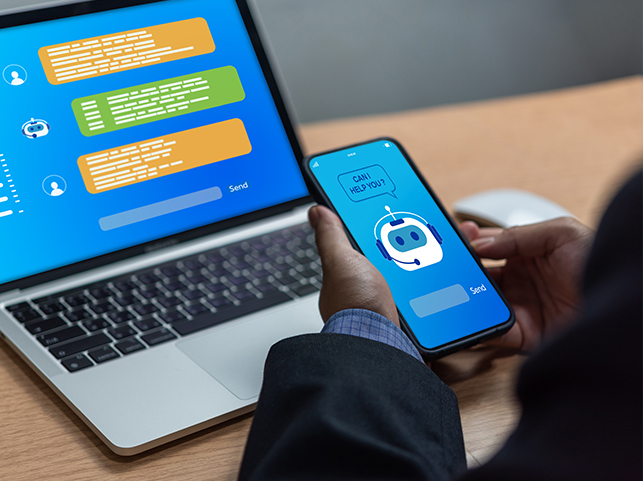
As an enterprise chatbot UI design company with cross-industry delivery experience, UX Stalwarts has a consistent principle in every engagement, which is that chatbot interface quality is measured not at the end of visual completion but at the end of user task resolution. The interface work does not finish until the design can demonstrate, through validated prototypes, that it performs according to that standard.
Failure-State Rigour as Standard Practice: Professional chatbot UI design services must treat failure (fallback, errors, and recovery states) as primary deliverables; we do exactly that.
Handoff Design as a Conversation Asset: The Bot to human escalation path is designed as an interaction sequence, not a technical default; we scope & deliver accordingly.
Metric-Anchored Design Decisions: Every visual and interaction decision is tied to some measurable chatbot performance target, containment rate, CSAT, or session completion before it is finalised.
We use industry-standard design and prototyping tools to ensure precision, developer-ready handoff quality, and validated interaction design, with every chatbot interface engagement.









Bank of America contact centers were overwhelmed with routine calls that customers should have been able to handle digitally. Our previous chatbot was frustrating and rarely resolved issues. UX Stalwarts designed conversational interface that actually worked. Reducing call volume 61 percent and improving containment from 28 to 74 percent transformed our service economics. The $127 million in cost savings while improving satisfaction to 8.7 out of 10 proved chatbot UI design is critical to digital banking success.
Delta flight booking was complex and intimidating, driving customers to travel agents and OTAs despite our direct channel advantages. UX Stalwarts designed conversational booking assistant that guided travelers through decisions. Increasing conversion 84 percent and growing ancillary revenue 37 percent per booking proved chatbot UI can drive both satisfaction and profitability. The 56 percent reduction in irregular ops calls showed conversational self-service works even during stressful disruptions. This chatbot transformed our digital commerce.
Verizon technical support was expensive and frustrating with customers calling about connectivity issues we could resolve remotely if we had better tools. UX Stalwarts designed conversational troubleshooting chatbot that actually fixed problems. Improving first contact resolution 73 percent and reducing calls 47 percent transformed our service operations. The $67 million savings from avoided truck rolls proved chatbot UI design delivers hard ROI. This platform changed how we support customers.
Evaluating a specialist chatbot design partner and need some straight answers before you go any further?
The discipline of designing the visual layer and interaction architecture of a chatbot is referred to as chatbot interface design, everything that a user sees and interacts with when they open the conversation window and interact with the bot. It embraces the design of the trigger for the widget, the layout of the opening screen, the design of the message bubbles and its styling, how we treat the avatar or identity, the quick reply button design, the input field behaviour, the typing indicator, the way the media and card formatting is done inside the chat window, the presentation of the fall back and error states, the design of the human handoff pathway, and the micro-interactions that determine how the conversation feels to the human on the other side of the screen. It is distinct from conversation flow design, NLP configuration, and chatbot development, though it needs to be designed in close coordination with all three.
The distinction is based on the standard relationship between UI and UX, in light of the conversational interface. Chatbot UX design covers the strategic and functional layer, what questions the bot asks at each step, what information it gathers, when it escalates to a human, how the conversation flows branch according to the user intent, and what is the ideal resolution path for each use case. Chatbot UI design is the layer that puts those decisions into a visible, interactive form: how is the response laid out in the chat window, does the user select a reply from buttons or type freeform, what does the handoff screen look like, and how does the error message guide the user when the bot can’t help. Both must be designed with care, but they require different skills, and also tend to be sequenced differently within a project.
Chat interfaces represent interaction limitations and communication necessities that do not exist in normal web or app interfaces. A web UI can utilise headers, navigation menus, side panels, and section labels to organise content and guide the user. A chatbot interface has to get across everything through a narrow sequential stream of conversation, which means that each message, each button label, and each visual cue is more important. Turn-taking dynamics, chunking of responses, message timing, typing indicators, and the visual difference between user and system messages are all issues that require design decisions that don’t come into play in standard UI frameworks. Beyond layout, chatbot interfaces need to be designed around failure states, those times when the bot does not understand, in ways that web UIs generally do not have to. This is so specific that chatbot UI is a unique design practice with its own requirements and conventions.
Designing the human handoff pathway means taking the bot-to-agent transition as a structured sequence of interaction and not a technical trigger. The design needs to ensure is clear to the user that transition is occurring, manage the user’s expectation if there is to be a wait period with queue position or estimated wait time display, confirm to the user when the agent has joined with a visual introduction that is distinct from the bots reply styling, and maintain the context of the entire conversation so the user does not have to repeat their query. One of the most popular sources of chatbot CSAT failure is a badly-designed handoff – the transition is silent, or not acknowledged, or the agent’s messages appear to look identical to the bot’s. We scope and design the full handoff pathway as one of the main deliverables in every enterprise chatbot UI engagement.
The principles for designing an AI interface, transparency, explainability, the appropriate calibration of trust, and user control, apply directly to chatbot interfaces, especially for AI-powered chatbots, the responses for which are derived by language models, not deterministic scripts. Users interacting with an LLM-based chatbot require visual and textual cues that signal when it is not sure, when it is offering a generated response as opposed to a human-written response, and when they should check the information instead of acting on it right away. The interface must also make it straightforward for the users to contest or re-route a response that he/she does not trust. These requirements do not replace the standard chatbot UI design considerations around layout, accessibility, and error states; they layer on top of these, which is why AI-powered chatbot interfaces have a more complex design scope than script-based chatbot interfaces.
Accessibility is a requirement for chatbot UI design – it is not an enhancement, but a requirement from a legal and ethical standpoint. A chatbot deployed on a public-facing digital product must be accessible to the standards of WCAG 2.1 AA at least, that means that we need to ensure that there is enough colour contrast between message text and the bubble backgrounds, that the interactions that users have with the chatbot are keyboard-navigable (which means that we need to design them for users who cannot use a mouse or touchscreen), that screen reader software can understand the structure of the conversation and the sequence of the messages, and that input affordances are designed so that they work across a set of motor and visual access scenarios. Enterprise chatbot interfaces serving internal employee audiences also need to comply with internal accessibility requirements and, in many jurisdictions, have a legal obligation under digital accessibility frameworks. We focus on integrating WCAG compliance checking into our design workflow in Figma from the first component build, instead of auditing to check for accessibility at the end of the project.
UX Stalwarts suggests considering any chatbot UI design agency on the basis of five specific dimensions before taking up engagement. First, confirm that their portfolio of work includes chatbot-specific UI work, not just general product design that happens to include a chat window. Second, ask how they design fallbacks and error states – the answer to this will tell you if they are thinking about failure as a primary design consideration or an afterthought. Third, ask if they scope the human handoff pathway as a design deliverable, or leave it to the development team. Fourth, confirm that they are building accessibility compliance into the design process instead of conducting an audit for it after visual design has been completed. Fifth, ask what kind of post-launch data they use to assess whether their design decisions turned out as they hoped, and the answer to this question tells you a lot about whether they consider design quality as a one-time output or as a measurable ongoing outcome.
Omnichannel chatbot UI design solves the problem of ensuring a consistent, on-brand interaction experience across whichever channel(s) the chatbot is being deployed in, which for enterprise products is usually a website widget, mobile app embed, WhatsApp integration, internal Slack or Microsoft Teams workspace, and maybe a voice interface. Each channel has its own layout constraints, interaction model, and component capability. A WhatsApp chatbot is not able to render the same rich-media card layout as a custom web widget, and Teams integration runs in its own visual framework. Designing for omnichannel requires designing a component and behaviour system that can both adapt appropriately to the limitations of each channel while maintaining a sufficient level of visual and tonal consistency that users identify the same product across all of them. Without this design system thinking, enterprise chatbot deployments end up feeling like different products on different channels, which erodes the brand coherence and user trust the chatbot was meant to build.
Chatbot user interface design cost is determined by a number of project-specific variables. The number of deployment channels in scope, a single web widget vs. a multi-channel system web, mobile, WhatsApp, internal tools, makes a big difference in increasing the component design and testing scope. The complexity of the flow of the conversation directly influences the number of different interface states and transition sequences that have to be designed. Whether the chatbot is an AI-powered LLM product or a script-based rule-based system has an impact on the design requirements around confidence signalling and output variability. Enterprise contexts requiring role-based display logic, multilingual layout design, or regulatory disclosure UI add further scope. Post-launch optimisation engagements are added as an ongoing component. Across all of these variables, the consistent principle is that when the complete design requirement is scoped accurately at the outset, including all of the fallbacks, handoff pathways, and accessibility requirements, the costs are more predictable than when these elements are treated as additions after the primary design work is complete.
Timeline depends on the scope variables described above. A specialised engagement that includes a single-channel chatbot interface with a set of conversation flows, standard fallbacks, and a single user role normally takes six to ten weeks from discovery to developer handoff. Multi-channel enterprise deployments, with multiple deployment surfaces, multiple user roles, complicated handoff pathways, and regulated industry disclosure requirements, will generally take fourteen to twenty weeks. For products where the chatbot UI needs to be designed in conjunction with the conversation flow, as opposed to applied to an already-defined flow, more time for discovery and flow mapping is needed before UI design can be started. In all cases, user testing using real conversation scenarios is something that adds value, and that is seldom recovered later through iteration, and should be part of the timeline planning and not left for a post-launch phase.
Fallback state design is one of the most consequential – and under-resourced – components of a chatbot interface. When a bot is unable to understand or respond to a user’s input, the interface needs to do three things at the same time: acknowledge the failure without leaving the user feeling as if they did something wrong, give the user a clear and credible way forward, which is rephrasing guidance, a menu of available topics, a direct route to human support, and do all of this in a tone and visual style that does not undermine the user’s confidence in the product, as a whole. For applications such as chatbots where out-of-scope queries are very common or anticipated, which incorporates most enterprise deployments, we design multiple variations of the fallout state that are dialled in to various types of failure: intent not recognised, knowledge gap, and out-of-hours conditions are all different ways for the interface to respond. We validate all the fallback states during the prototype testing before handoff.
A full-scope engagement typically generates conversation flow documentation from the mapping phase, information architecture that defines the component hierarchy and state logic of the chat interface, visual design that covers all primary interaction states, and all the fallback and error states, persona design documentation that covers avatar, message style, and tone guidelines, interactive prototype that is validated against real conversation scenarios, developer handoff documentation that covers all chatbot UI components, and their conditional display logic, and accessibility audit documentation that confirms WCAG compliance on all the designed component set. Enterprise engagements have the added benefit of creating an omnichannel component system that manages chatbot user interface consistency across all deployment channels. Post-launch engagements include analytics review reports and iterative design recommendations from the data collected from the deployed product regarding fallbacks rate, session completion, and handoff frequency.
Redesign of an existing chatbot interface is a common and well-defined engagement type. The starting point is to do a structured audit of the existing interface against the primary performance metrics (fallback rate, session completion rate, handoff volume, and CSAT) as well as a usability review of the existing design’s visual hierarchy, message clarity, error state handling, and handoff pathway. This audit usually identifies a set of high-impact interface issues that can be resolved without rebuilding the entire chatbot, failures of message structure and response formatting that create high cognitive load, designs for quick-reply buttons that users miss, failure messages that create uncertainty instead of recovery, and handoff pathways that interrupt the conversation rather than extend it. These improvements can often be delivered within a more narrow scope and shorter timeline than a full redesign, with measurable impact on the target metrics within weeks of deployment.
UX Stalwarts operates from its headquarters in Noida, with global delivery experience across the spectrum of clients from the United States, Europe, the Middle east and the Asia-Pacific region. Working with an India-based chatbot UI design specialist has several practical benefits for enterprise clients, including access to a deep talent pool of user experience professionals with robust enterprise product design experience, competitive engagement economics compared to similar practices in North America and Western Europe, and well-established delivery models to meet the asynchronous collaboration needs of cross-timezone projects. Language, regulatory awareness, and global delivery infrastructure are not constraints; our team has designed chatbot interfaces for products operating under GDPR, HIPAA, and India’s Digital Personal Data Protection Act, in markets spanning multiple languages and cultural contexts.
Professional chatbot UI design services are worth the investment precisely when the chatbot represents a significant customer experience touchpoint, a primary self-service channel, a high-volume support interface, or a product that users will be putting their brand judgment on. Platform-native design tools have templates and basic customisation that are adequate for simple and low-stakes deployments. They do not offer the conversation flow mapping discipline, the fallbacks and error-state design rigour, human handoff pathway design, omnichannel consistency architecture, or accessibility compliance work that enterprise chatbot deployments demand. UX Stalwarts brings a design practice specifically built around conversational interfaces, with a delivery scope that includes the components most platforms leave undesigned, and a post-launch optimisation capability that closes the loop between interface decisions and measurable chatbot performance outcomes.

C – 81C, Sector – 8, Noida 201301, India


1025 Beamon Drive, Franklin 37064 Tennessee, USA
Sveavagen 34 111 34 Stockholm, Sweden
A-10, Sahastradhara Rd, Doon IT Park, Dehradun, Uttarakhand

© 2026 UX STALWARTS. All rights reserved.